
If you’ve ever wished GarageBand for Mac had a proper mixer, you’re definitely not alone. For years, users have asked Apple to add one yet, somehow, it’s still missing.
But here’s the thing: there is a full mixer hiding in plain sight. You just need to know where to find it.
That’s where Logic Remote comes in.
What is Logic Remote?
Logic Remote is a free app from Apple that turns your iPad or iPhone into a powerful wireless controller for GarageBand, Logic Pro, and MainStage. Once it’s connected to your Mac, you can use it to play instruments, tweak Smart Controls, navigate your projects, and access a complete mixer that GarageBand itself doesn’t include.
You’ll find it on the iOS App Store, and setup couldn’t be simpler. Make sure your Mac and iOS device are connected to the same Wi-Fi network, open GarageBand on your Mac, launch Logic Remote on your iPhone or iPad, and select your Mac when it appears. Confirm the connection, and you’re ready to go.
Hands-on Control for GarageBand
Once you’re connected, Logic Remote mirrors the key transport controls from GarageBand’s interface: play, stop, record, cycle, and metronome. It also displays your project’s position in bars and beats or minutes and seconds, depending on your GarageBand settings.
That alone is handy enough, but the real fun starts when you start controlling tracks.
From the View menu, you can switch between software instruments, audio tracks, and Drummer tracks. Each view gives you touch-friendly controls:
- Software Instruments: Play notes and chords using on-screen keys or chord strips.
- Audio Tracks: Access Smart Controls for EQ, effects, and other parameters.
- Drummer Tracks: Adjust performance and pattern settings in real time.
And, of course, the big one: the Mixer view.
Unlocking the Hidden Mixer
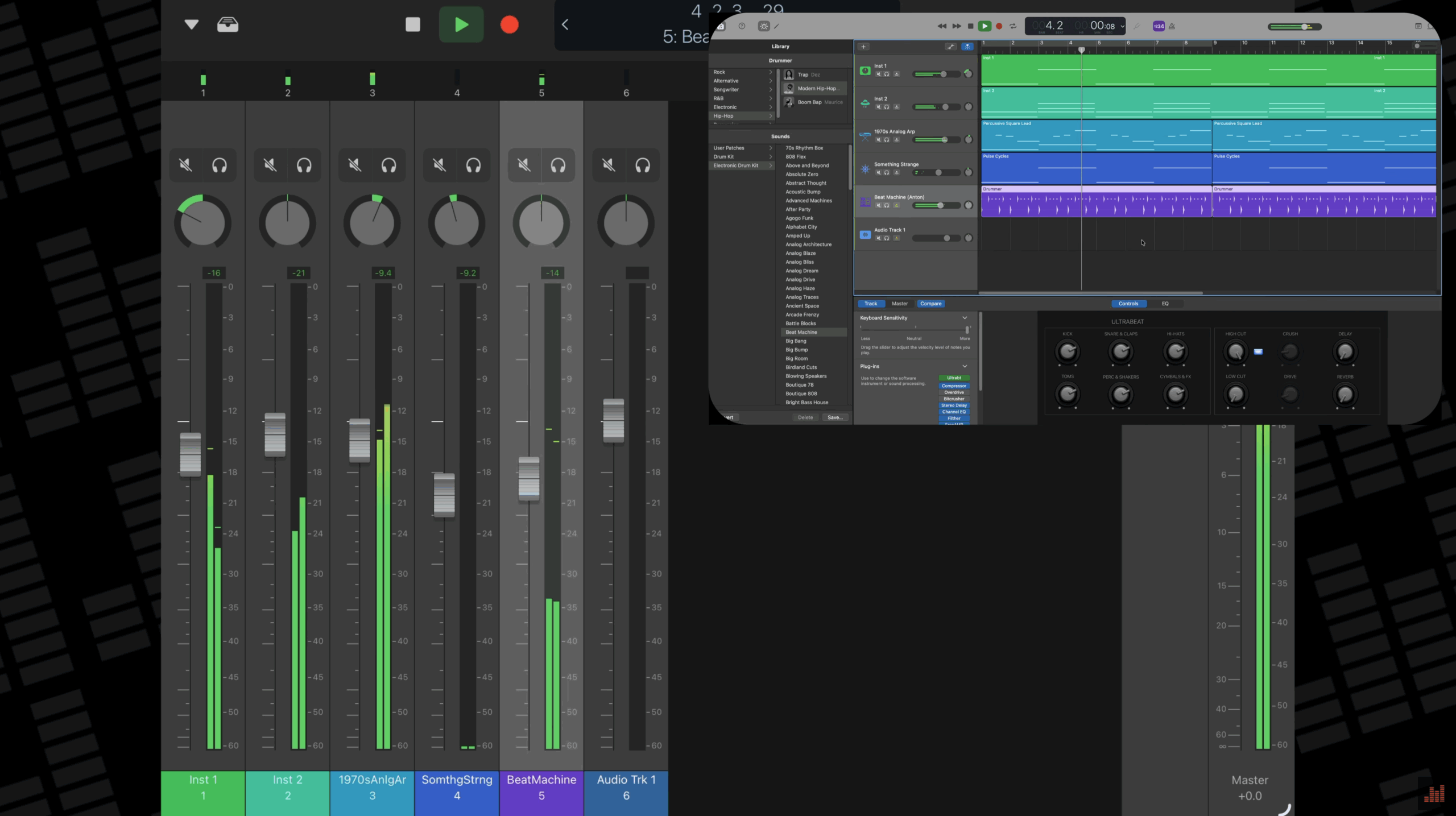
Tapping Mixer in the View menu reveals what GarageBand users have been missing for years; a real, tactile mixer with channel strips for every track in your project. Each strip includes:
- Volume fader
- Pan knob
- Solo and mute buttons
- Level meters
You can scroll horizontally to see all your tracks, or vertically for deeper control. It feels far more intuitive than mousing around GarageBand’s interface, especially when you’re fine-tuning a mix.
If you’re using an iPhone, the layout is simplified: rotate your phone vertically, and you’ll see the channel strip for the currently selected track. You can still adjust levels, panning, and mute/solo without any hassle.
Bonus Features
Logic Remote goes beyond basic mixing. You’ll also find quick access to:
- Track creation and duplication
- Undo/redo
- Keyboard shortcuts as one-tap buttons
- Logic Remote Help
- Smart Help, which opens Apple’s interactive GarageBand user guide
For a free companion app, it’s surprisingly deep. Once you start using it, it’s hard to go back to mixing with just a mouse.
GarageBand’s simplicity is both its biggest strength and its biggest limitation. Logic Remote bridges that gap beautifully. It adds a layer of professional control that feels natural and immediate, giving you a taste of what Logic Pro offers without spending a penny.
If you’ve ever struggled to balance tracks or wished for more tactile control, download Logic Remote, connect it to GarageBand, and discover what you’ve been missing.
Logic Remote is available for free from the iOS App Store Here