
AudioKit has been a prolific force in the world of iOS music apps over the past few years, consistently delivering accessible and high-quality instruments like House: Mark 1, King of FM, and King of VHS. But with Synth One J6, they’ve done something truly remarkable. And remarkably generous.
Built as a spiritual successor to the much-loved (but AUv3-less) original Synth One, Synth One J6 is a full-fat synthesizer that took nearly three years to develop. The best part? It’s completely free. No subscriptions, no in-app purchases (at least, not ones you’re encouraged to use), no freemium bait-and-switch. Just powerful, professional-grade sound design tools for anyone with an iPad or iPhone.
A Deep Preset Library to Dive Into
The moment you launch Synth One J6, you’re met with a mammoth library of over 400 presets. These are no stock filler sounds either – they’re expertly crafted by contributors like Analog Matthew, DMT Cymatics, Red Sky Lullaby, Moby Pixel, Electronisounds, and even The GarageBand Guide (shameless plug).

From lush pads to thunderous basses, biting leads to expressive keys, the sound bank is thoughtfully organised and refreshingly inspiring. Whether you’re just getting started with synthesis or you’ve already got a few plugin folders bursting at the seams, Synth One J6 is likely to surprise you.
Clean Interface, Deep Engine
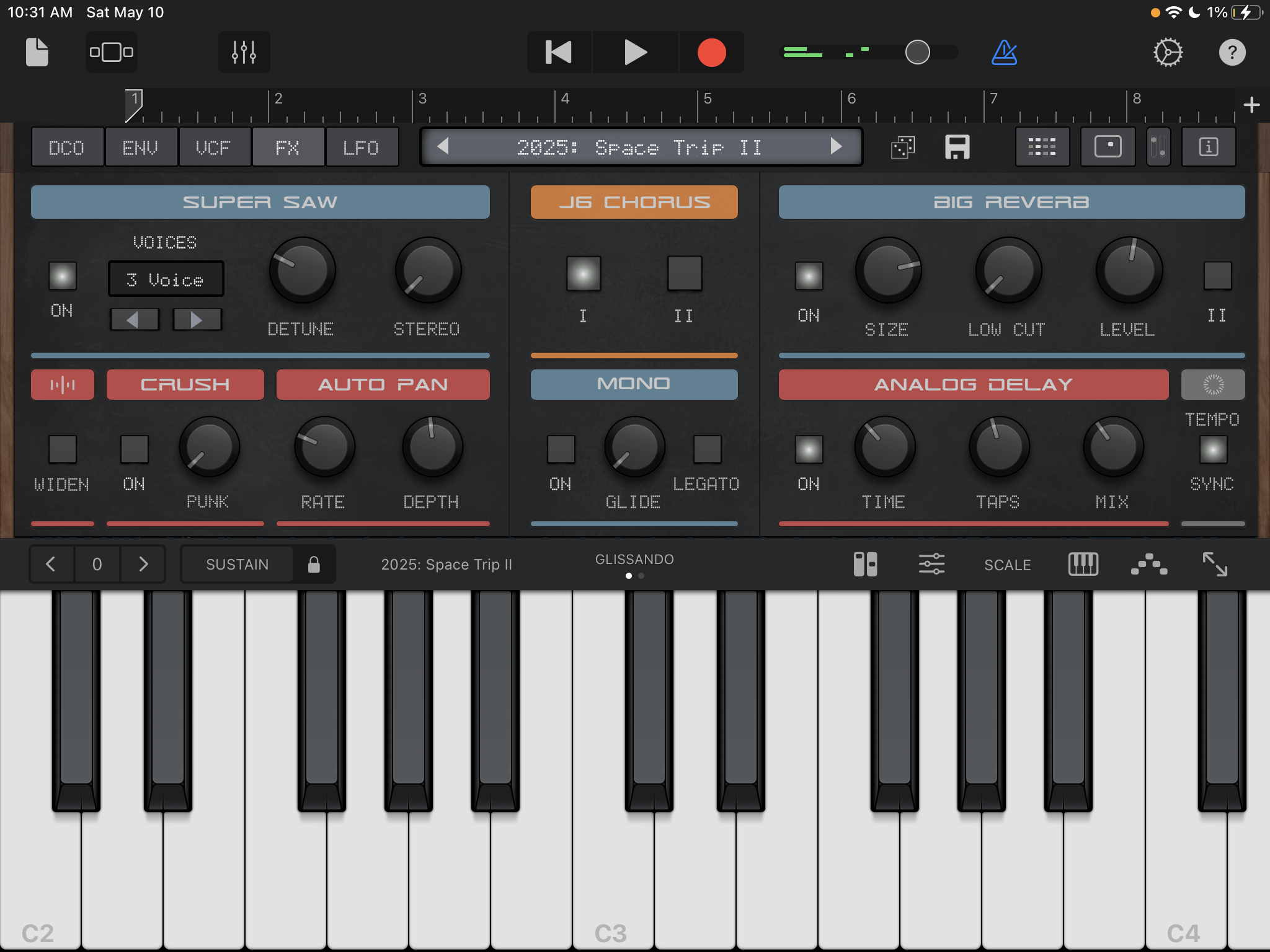
The user interface will feel instantly familiar to anyone who’s used an AudioKit app before. Split across seven intuitive tabs, the layout manages to feel uncluttered without skimping on features. Key highlights include:
- Dual touch pads for live FX control
- Built-in step sequencer and classic-style arpeggiator
- Delay, reverb, chorus, bit crush, and other onboard effects
- Three LFOs with over 60 modulation destinations (yes, including LFOs modulating LFOs)
- Jupiter-8-style filter with rich character
- Full MIDI Learn support
- Tempo sync options across many parameters
There’s also a record button built right in, making it easy to capture sound design experiments or musical ideas without leaving the app.
Not Just Analog-Inspired. Analog-Trained
One of the standout features here isn’t something you can see, but you’ll definitely hear it.
Rather than simply mimicking analog waveforms through clever coding, AudioKit went a step further. They recorded hours of audio from genuine analog synths – classics like the Jupiter-8 and Juno-106 – then trained the app using machine learning to model their behaviour.
The result is genuinely impressive. There’s a subtlety to the pitch drift and a warmth in the response that feels organic. Synth One J6 doesn’t just try to sound analog. It behaves like analog.
Designed With Accessibility in Mind
The decision to make Synth One J6 free wasn’t just a marketing gimmick. It’s a conscious push for accessibility, particularly for schools and students who often have iPads but can’t afford even the cheapest paid apps.
Despite the zero price tag, there are no corners cut. The app runs inside GarageBand and Logic Pro for iPad, supports both touch and external MIDI controllers, and offers a full-featured synth experience without limitations.
Hidden Gems and Pro Features
There’s a suite of additional effects tucked away beyond the main FX tab, including tremolo, auto-pan, and stereo widening. You’ll also find BPM-syncable modulation, global tuning controls, and even a 432Hz tuning toggle for those who like their A’s a little flatter.
It’s also worth noting that Synth One J6 comes pre-mapped for certain hardware synth controllers and interfaces seamlessly with most MIDI setups.
In blind listening tests, Synth One J6 was chosen over a $200 desktop soft synth by musicians looking for a more “analog” sound 80% of the time. And when compared to actual hardware, it was mistaken for the real thing just as often as premium plugin equivalents.
This isn’t just hype. AudioKit has receipts, and Synth One J6 genuinely holds its own against the best in the business, free or otherwise.
The Only “Catch”? Apple’s Cut
There is technically an in-app purchase option, but here’s the deal: Apple required AudioKit to include it to get the app approved for the App Store. Unfortunately, Apple takes a 30% cut of any donations made this way.
If you’d like to support the developers – and you really should – it’s better to donate directly through Donorbox. That way, 100% of your tip goes to the team that made this app possible.
AudioKit Synth One J6 is available for iPhone and iPad from the iOS App Store here.